DOGE · DRC-20 · Doginals
Balances, sends, and inscriptions without parking coins in a custodial browser vault.
Doge
Browser extension
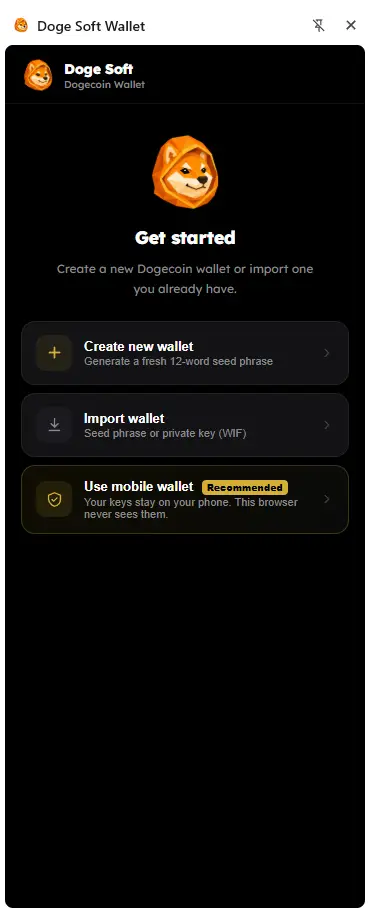
Grab the extension from your browser store, pair your Doge Soft mobile wallet once, then approve on your phone. Keys stay on-device—even while you click around the Dogecoin web.
Mobile connect
Scan a QR from Settings → Connect Browser. The extension talks to dApps; your phone does the signing. First of its kind energy for Dogecoin Layer 1.
Add Doge Soft from Chrome, Firefox, or Brave. Side panel + popup, ready for the orbit.
In the mobile wallet, open pairing. A QR appears—that’s your secure handshake, not a seed dump.
Send DOGE, DRC-20, Doginals, or sign a PSBT. Confirms buzz on the device that holds the keys.
What it unlocks
Same orbit you already know—wired through the browser when you need it.
Balances, sends, and inscriptions without parking coins in a custodial browser vault.

Quote and kick off DRC-20 swaps through the Doge Soft AMM rails—approve on mobile.
Sites call connect, signMessage, signPsbt, sendDoge, sendDrc20—one provider, Dogecoin-native.
Jump to Explorer, Pulse, Bridge, Docs—and keep signing where it belongs: on you.
Also onboard
Create or import a seed / WIF into an encrypted vault, multi-account, auto-lock. Mobile pairing is the recommended path—local vault is there when you want it.
For builders
window.dogesoft
Same provider language as the rest of the stack. Detect isDogeSoft,
request accounts, sign, push. Users can approve from the phone when paired.
if (window.dogesoft?.isDogeSoft) {
  const accounts = await window.dogesoft.request({
    method: "doge_requestAccounts",
  });
}Get set up
Install from your browser store, pair the mobile wallet once, then sign on your phone. Three browsers. One orbit.
Get the mobile wallet →Chrome is live. Firefox and Brave are coming soon. Pairing lives in Settings → Connect Browser.